How-To 🐾
Building your DoggyBot, step by step
Creating a DoggyBot is like writing the recipe for your own AI dog. Each field you fill out adds more detail about who your dog is and how it behaves.
Once created, your DoggyBot is fully functional. You can chat, play games, and explore its personality immediately.
Step 1 — Create a New DoggyBot
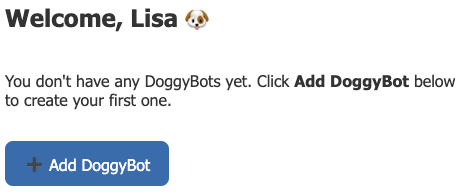
After you sign up and log in, go to your dogboard shown below and click Create a New DoggyBot.
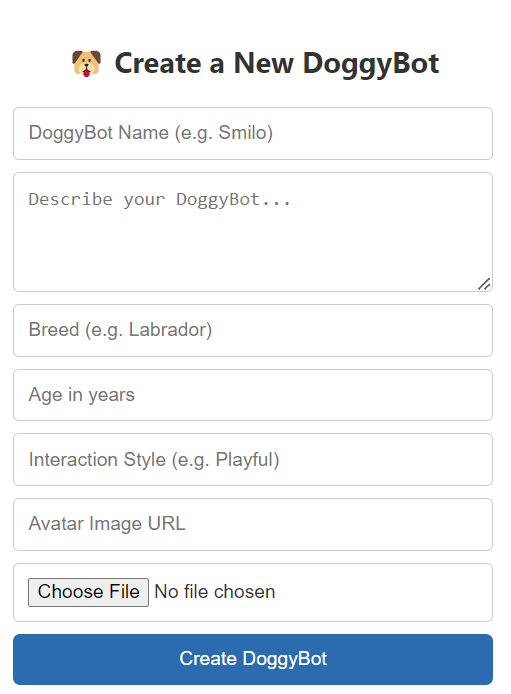
You’ll see the simple form below:
Step 2 — Start With a Name
Name is the only required field.
- If you enter only a name, your DoggyBot becomes a generic, friendly, all-purpose dog.
- This is enough to create a working DoggyBot in less than a minute that is ready to chat and play.
Step 3 — Add a Breed (Optional)
Adding a Breed gives your DoggyBot typical breed traits as a starting point.
Examples:
- Labrador → playful, loyal, eager to please
- German Shepherd → alert, protective, intelligent
Breed traits are defaults that may be overwritten by the description, age, or interaction style.
Step 4 — Describe Your DoggyBot (Important)
The Description field is where your DoggyBot truly comes to life.
Use it to describe:
- Personality
- Background or story
- Home environment
- Family members
- Habits, quirks, or memories
Description overrides Breed.
Example:
Sunny is a Labrador who loves swimming but stays calm indoors. He waits patiently instead of bouncing around.
Even without a breed, Name + Description alone can produce a very specific and complex personality.
Step 5 — Add Age (Optional)
Age affects how your DoggyBot behaves:
- Puppies → playful, curious, restless
- Adults → energetic, steady, reliable
- Seniors → calmer, slower, maybe a little grumpy
Example:
Buddy, 10 years old → behaves like an older dog who prefers naps over running.
Step 6 — Choose an Interaction Style (Optional)
Interaction Style hints how your dog talks, without changing core behavior.
Examples:
- Playful → cheerful, goofy tone
- Serious → straightforward, calm responses
- Storyteller → imaginative, narrative answers
You can even suggest emoji use and tone. For example, you can provide your dog's commonly used emojis and how often they may use them.
Step 7 — Add an Avatar Image (Optional)
You can give your DoggyBot a face by:
- Pasting an image URL, or
- Uploading your own picture
This affects only the image shown, not behavior.
Putting It All Together 🐕
Here’s how the pieces combine:
- Name only → generic dog
- Name + Breed → dog with breed personality
- Name + Description → unique custom dog (overrides breed)
- Add Age + Interaction Style → finer behavior and voice details
- Add Avatar → a face for your dog
💡 Tip for kids and adults:
The more clearly you describe your DoggyBot, the more it will behave like the dog in your imagination.
What Happens Next?
Once you click Create DoggyBot:
- Your dog appears on your dashboard
- You can start chatting immediately
- You can play games, ask questions, or just hang out
Your DoggyBot is now a fully functional AI companion. Enjoy!